


Context & Scale
This pattern is concerned with the use of shared online whiteboards to support synchronous small group collaborative activities (Handley, 2023) in large classes. Online whiteboards have been shown to foster student engagement (Campbell et al., 2019; Reguera & Lopez, 2021) and promote collaboration (Chan et al., 2023; Rojanarata, 2020; Li et al., 2021), which can support active learning.The multimedia nature of online whiteboards in allowing creation with a range of different media such as text, image, video and other design elements may support different learning preferences and styles, as well as students’ development of 21st century ‘multiliteracies’ (Chan et al., 2023).
There are challenges in supporting active learning in large classes (Cuseo, 2007). A common strategy is dividing classes into small groups to undertake activities or discussions. However, when a large class is split into smaller groups, it can be difficult for the teacher to have an overview of the separate discussions to understand how to shape the activity and where to target formative feedback. This is exacerbated in online classes using breakout room features, as it is not possible for the teacher to be in multiple rooms at once with students, meaning they have little oversight of how different groups are progressing. It can also be difficult for teachers to summarise and synthesise outcomes from across the discussions of a large class during a debrief or reflection session. If students take notes from their group discussions individually, there may not be any shared documentation or a record for students to use for revision, or for the teacher to refer to for planning and feed-forward. A shared online whiteboard creates visibility for gathering and collecting ideas across separate discussions within a large class. From a set design perspective, it can support interaction and cross-fertilisation between groups that may otherwise be discrete.
Problem
When a large tutorial class is working in separate small groups it is difficult for the teacher to have an overview of how groups are progressing to guide the activity and give targeted formative feedback. This is especially the case in online classes using breakout rooms. Additionally, when debriefing as a whole class after small group activities, it is challenging to have a visual summary from each group that can be shared collectively during and after class.
Solution
This problem can be addressed using a shared online whiteboard designed with a template that provides space for an overview of all individual groups to be seen together and where students add their notes from small group discussions or activities. The teacher can monitor the progress of these notes in real time and use them to direct formative feedback during the activity. When the whole class comes back together, the shared whiteboard can be used by students to give an overview of each small group discussion. The teacher can use it to support summarising and synthesising, making connections between groups to deepen the discussion. The teacher and students can also refer to the notes after class as revision (for students) or to inform feed-forward and planning the following week’s activities (for teachers).
Implementation
Select an online whiteboard tool e.g. Miro, Mural, Lucidchart.
Create a template that provides spaces for multiple small groups to add notes/contributions in their own dedicated areas.
- Provide an orientation/home area on the template with instructions for navigating the board.
- Each separate group area should be labelled with a group number/name so students know where to work.
- Provide written instructions for how to complete the activity in a clear area on the template.
- Depending on the activity, consider creating a structure for each small group’s area on the board. For example, if the task is to apply a theoretical framework from a course reading, create a visual structure that represents that framework e.g. using labelled columns or a matrix, where students can position their contributions as relevant. This structure can be duplicated across multiple group areas for groups who are working on the same framework.
Optionally, if students are using the tool for the first time, create an icebreaker activity using the tool so that students have a low-stakes opportunity to familiarise themselves with navigation and basic functions such as adding sticky noes and text before completing the learning activity.
During class, spilt students into small groups and make sure each group knows their group name/number. This will correspond to the pre-labelled area on the shared whiteboard template.
Give students verbal instructions for completing the activity/discussion using the template.
Share the link to the template during class. This link can also be included on the LMS.
During the activity, monitor the notes being added to the template and use this to guide where you target formative feedback as you move between groups. Activity on the whiteboard might also give a sense of whether the timing needs adjusting and/or whether there are areas students need more help with.
At the end of the small group activity, reassemble the class into a whole group and display a zoomed out, overview version of the whiteboard on a shared screen. Use this overview to summarise, synthesise or provoke deeper conversation and reflection. Where possible, call on students to report on their group discussions and make connections/comparisons to other groups. Use the zoom in function to more closely show individual group responses.
Encourage students to revisit the whiteboard for revision. The whiteboard may also be useful for the teacher to revisit for planning and feed-forward purposes.
Examples of pattern in use
WORK6040: Emerging Challenges in Industrial Relations
Context
This pattern was evaluated in one semester of a postgraduate unit on Industrial Relations in the Work and Organisational Studies discipline. The unit had around 90 enrolled students with a mix of domestic and international students. While some of the cohort was very experienced and may have worked professionally in the field for several years, another part of the cohort had little experience in Australian IR and the local context.
This pattern was developed and implemented in WORK6040. We would like to acknowledge the Unit Coordinator Jo Orsatti and Learning Designer, Enosh Yeboah.
Description
This unit is delivered via lectures and four intensive workshops across a 13-week semester. The workshops are designed to be active and participatory with students working in groups to discuss and analyse critical readings and key concepts relating to emerging challenges in industrial relations. The workshop of around 90 students is taught as a large class with two teachers in a team-teaching mode. The unit used an innovative classroom specifically designed for modular teaching of large interactive classes. The spatial design, AV and furnishings of the learning space supported the cohort to transition between different modes, such as whole class, tutorial groups and small group huddles. The online whiteboard was designed to be a digital learning space used across the semester with each of the four workshops templates positioned on the same whiteboard (Figure 1).

This gave students an overview of the whole semester’s worth of workshop activities in one online space. Each of the four workshop templates included separate areas for the three main collaborative activities, which each used a visual framework drawn from the course readings. This visual framework was duplicated across 10 separate group spaces nested within each topic area of the template. The design also included a ‘landing area’ with navigation to the four workshops and instructions on how to use the template. Students were provided with training videos for basic navigation in Miro and an icebreaker activity where students added emojis to an image was also designed to introduce students to basic navigation and functions of the tool in a low-stakes context.
Technology and resources
The development in this unit made use of the online whiteboard tool Miro. A template was developed and linked from the LMS. Initially another online whiteboard tool was trialled (Sandbox), however this was in its first release and proved to be unstable with not all students being able to see each other’s contributions. Thus, Miro was introduced which worked well for both students and teachers.
Findings
The use of the online whiteboard tool was evaluated using a student survey and focus group. Most surveyed students (86%) agreed that the use of the online whiteboard in the workshop supported their learning. Comments included that the tool was “engaging and interactive, it effectively provides an opportunity for everyone to participate actively”, “helpful with working with others”, “awesome interactive experience”, and “easy to use and interactive”. These comments suggest that the use of the tool can support active participation in small group learning within large classes. From observation we could see students personalised the templates using stickers, emojis and GIFS, adding a sense of playfulness and ownership to the learning experience (Figure 2).
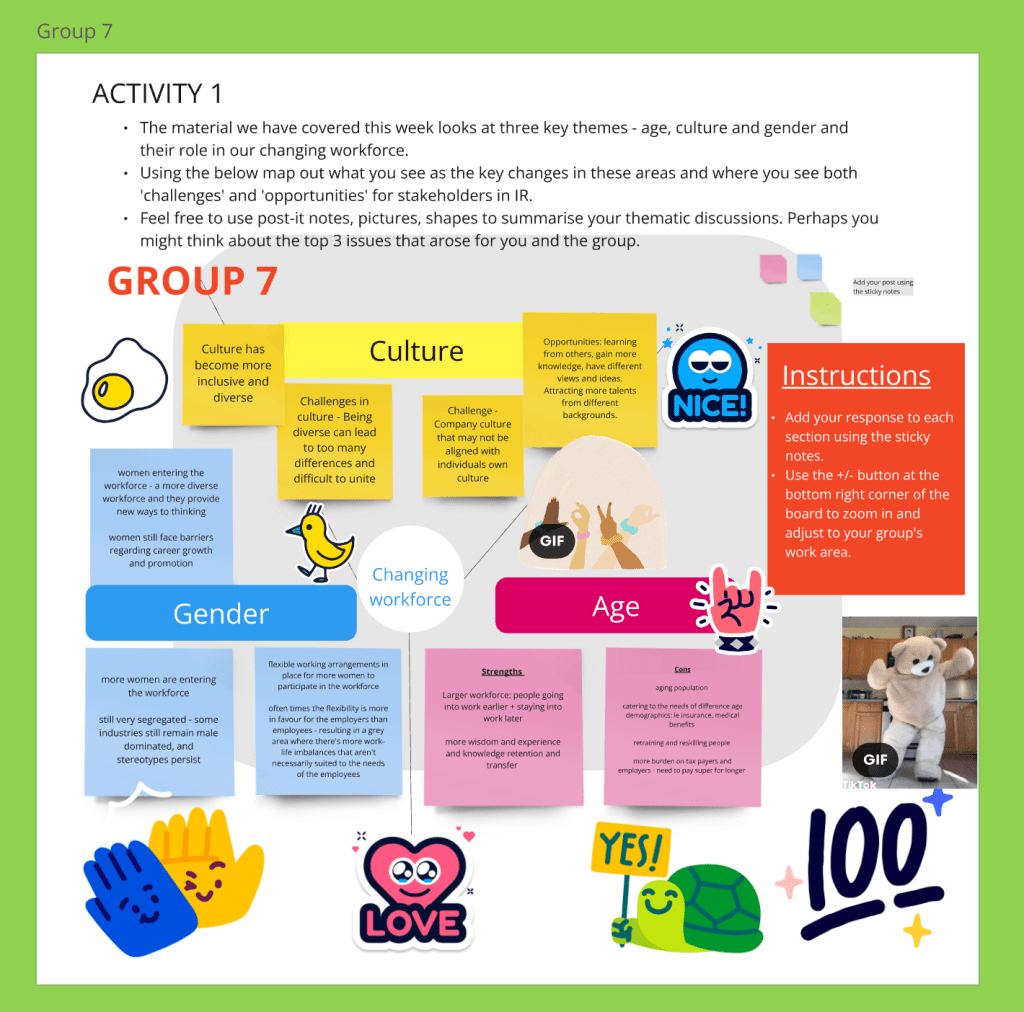
The survey elicited only one negative comment that the tool was “Okay but quite confusing. Too many movements.” This was echoed by another student in the focus group. The students’ perception of the whiteboard having “too many movements” may be addressed by using the Miro setting that allows users to hide others’ cursor movements. This option could be demonstrated to students in large workshops where having many cursors visible at once is distracting.
Leave a Reply